






What is Azure Key Vault? A beginner’s guide and use cases


June 15, 2026 12 min read 734 views
How to keep your cloud secrets secret with Azure Key Vault.
Azure Key Vault is Microsoft’s cloud-based service for securely storing cryptographic keys, secrets, and certificates, using Hardware Security Modules for advanced protection. It centralizes these components so technology specialists no longer need to write custom code to retrieve secrets in the cloud, helping organizations strengthen data protection while meeting regulatory requirements such as SOC 1/2/3, ISO 27001, HIPAA, and GDPR.
This growing emphasis on cybersecurity reflects a wider industry trend: according to the 2023 Global Future of Cyber Survey conducted by Deloitte, 70% of respondents said cybersecurity is now a regular topic of board-level discussion, raised monthly or quarterly. Adopting a managed solution like Key Vault gives organizations more control over sensitive information and greater certainty that their data is protected against cyber threats.
What are the main ways to use Azure Key Vault?
Key Vault can be used for:
- Secret management. When referring to ‘secrets,’ we mean confidential information such as passwords, database connection strings, API (application programming interface) keys, and other sensitive data that needs to be kept private and secure. Key Vault also provides a range of features for securing secrets, namely access policies, soft-delete functionality, and auditing capabilities.
- Key management. In this instrument, keys are deployed to secure secrets and other sensitive data, to manage key permissions and policies, as well as to perform encryption and decryption operations. Hence, Key Vault suits the role of a key management solution.
- Certificate management. With Key Vault, organizations can securely store digital certificates in the cloud. This number encompasses public and private Transport Layer Security/Secure Sockets Layer (TLS/SSL) certificates. It also provides features for managing digital certificates, including certificate lifecycle management, certificate revocation, and certificate auto-renewal.
There are several ways to access Key Vault, depending upon the specific use case and requirements:
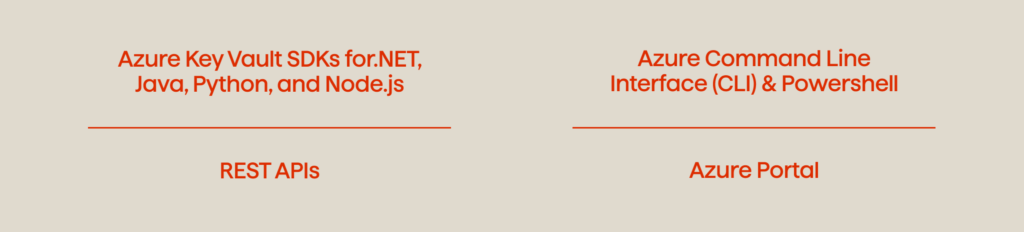
These access methods allow for greater flexibility and ease of integration into the various development environments of Key Vault. The REST APIs, for example, are suitable for use in any programming language. This characteristic opens up room for developers with different technical backgrounds when it comes to seamlessly aligning the solution with the company’s goals. At the same time, the Azure SDKs (software development kits) offer direct access to a more streamlined and intuitive experience for specialists working within the Azure ecosystem.
Moreover, the Azure Portal provides a web-based interface that enables non-technical stakeholders to manage access policies and perform basic operations, such as key and secret creation. Most importantly, it doesn’t require extensive technical expertise. As a result, an abundance of integration options that tightly control access to Key Vault empower technology professionals and organizations to opt for the most suitable approach that aligns with their needs and expectations.
Azure Key Vault overview: key benefits for security and compliance
Azure Key Vault gives companies secure access control and management of their secrets, keys, and certificates across applications and infrastructure. This includes businesses in finance, healthcare, and retail — industries where strict compliance and regulatory requirements make Key Vault’s certifications especially valuable.
Microsoft’s security business now serves nearly 1.5 million customers following its fiscal 2025 performance, with Microsoft Cloud revenue surpassing $168 billion annually, reflecting the company’s continued investment in strengthening its cybersecurity practices against an ever-changing risk landscape. Key Vault is emblematic of these advancements, offering convenience and simplicity that have been refined over the years. Here are some of the advantages Key Vault brings to the table:
1. Centralization. Key Vault embodies a centralized repository for all the cryptographic materials of an organization’s applications and services. The advantage of centralization is especially crucial for large-scale operations in Azure. Hence, with Key Vault’s centralized certificate management, technology specialists can easily issue and manage certificates for their applications and services. There is no need for multiple certificates for the different components of a single application. Centralization also means that businesses can enforce consistent security policies across their applications and services, and ensure that data is managed and protected in a uniform manner.
2. Security. A wide range of security features that safeguard the confidentiality, integrity, and availability of data are available for Key Vault users. First and foremost, Key Vault deploys Hardware Security Modules to protect keys and application secrets, which provides a higher level of security than software-based solutions. Additionally, it establishes a key vault access policy that allows a company to control who and when can access application secrets, and what operations users can perform with these secrets. Another option is available when it comes to establishing a secure and private connection between Azure resources and client devices. For instance, businesses can connect to Azure services (such as Key Vault) via a private IP address in their virtual network with the help of Azure Private Link which provides flexible, but secure access.
Discover how Avenga’s software engineering team accelerated the development of a new digital product for Olo
3. Control. Audit capability refers to one of the integral features of Key Vault. It empowers companies to seamlessly supervise access to their applications; thus they benefit from complete transparency and control. With Key Vault, you can monitor all user activities and choose to archive logs to a storage account, stream them to an event hub for real-time supervision, or send them directly to Azure Monitor logs for centralized secrets management and analysis. Besides, logs can have restricted access or be deleted whenever they become irrelevant. This feature lets users adopt a logging and auditing approach that aligns with their specific objectives and compliance requirements.
4. Simplicity. With the growing complexity of data storage techniques, organizations typically strive to deploy well-orchestrated services that streamline the management of sensitive information and help ensure that security measures are seamlessly incorporated into their applications. Key Vault lends itself to these challenges. Firstly, there is no need for in-house knowledge of Hardware Security Modules if your team leverages this solution. Secondly, it makes it possible to replicate the same security configuration across all applications. You can avoid creating custom code and ultimately reduce the potential for human error. Consequently, by automating numerous tasks involved in secret management, such as key rotation and certificate renewal, this tool reduces manual intervention and lowers the risk of data breaches.
5. Interconnectedness. As a powerful element of the ecosystem, Key Vault easily integrates with multiple Azure services. It can protect and manage secrets and keys across multiple applications, particularly Azure Logic Apps, Azure Virtual Machines, or Azure Data Factory. These integration options open up room for a convenient migration to Azure and at the same time deliver a comprehensive suite of services for the company’s specific needs. In addition to being seamlessly aligned with other Azure services, Key Vault also offers integration with third-party solutions, such as Kubernetes. This powerful range of possibilities results in a more comprehensive and flexible approach to secure key management across different platforms and environments.
Given these advantages, Azure Key Vault serves as a valuable and convenient tool for businesses striving to safeguard their security posture, protect data, and beef up their use of the Azure ecosystem. Moreover, it continues to evolve and expand its features so as to guarantee that businesses can stay ahead of emerging threats and stay competitive along the way.
What are the main use cases for Azure Key Vault?
Azure Key Vault is deployed in scenarios where applications need securely stored credentials and protected cryptographic keys, secrets, and certificates. You can use Key Vault to create and maintain keys that encrypt your cloud resources, with access tightly controlled via Microsoft Entra ID. Common implementations include on-premises data integration, healthcare AI architectures, and OAuth 2.0 token refresh for web services. Each use case below addresses a specific technical challenge.
1. Incorporation of cloud-based data into on-premises data storage with Logic Apps and SQL Server
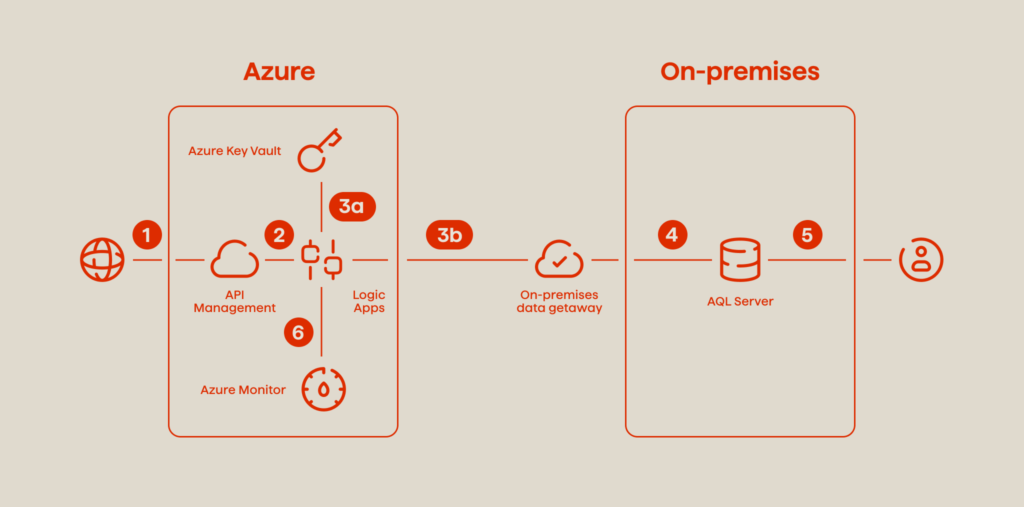
You can deploy this framework to streamline data integration procedures, though it weighs heavily on the following elements:
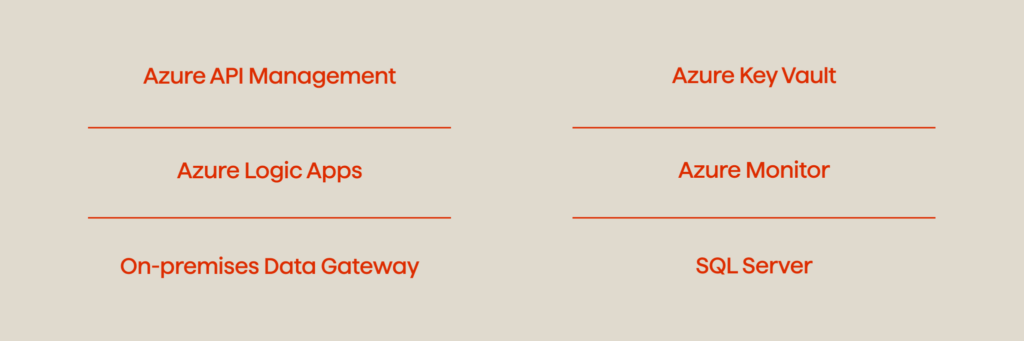
In this workflow, API calls are processed by an API Management solution (1) and then transferred to Logic Apps (2) as HTTP requests. The integration of Azure API Management further enhances security when it comes to the verification of keys, tokens, certificates, and other credentials before routing API calls to Logic Apps. In the next step, every HTTP request causes a set of actions within the Logic Apps (2), where Key Vault (3a) serves as a source of database credentials which enables proper authentication and smooth data protection (4). With Key Vault, this architecture prioritizes the confidentiality and integrity of data integration processes.
2. Azure Healthcare Blueprint for Artificial Intelligence (AI)
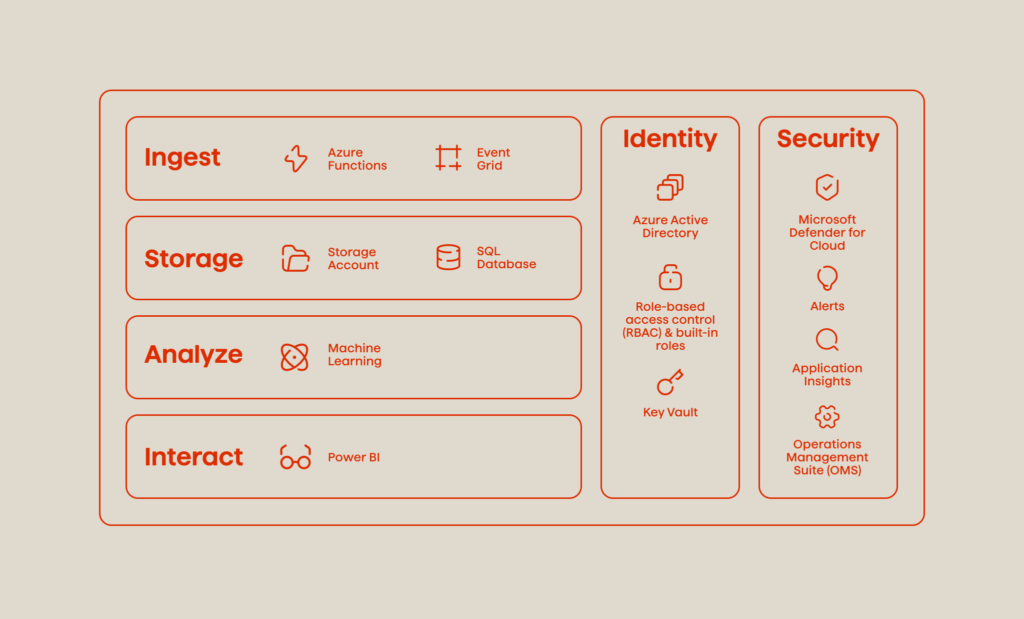
Healthcare organizations continue to adjust to the constantly evolving landscape, by transfusing their daily operations with AI and Machine Learning (ML). This guideline showcases how to integrate Azure services for enhanced use of these rapidly advancing technologies in a secure and compliant manner. In the listing below, you can learn how to set up proper PaaS (Platform as a Service) architectures. These are the integral elements of the blueprint:
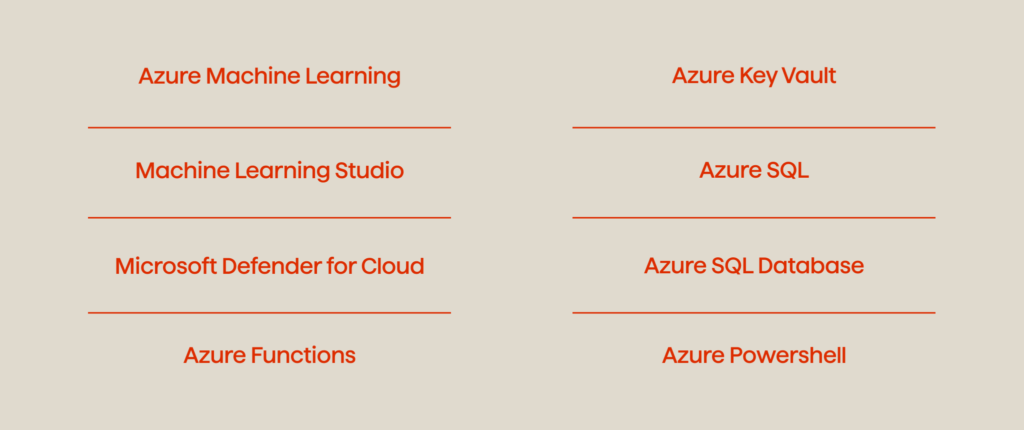
In this architecture, Key Vault provides a reliable and compliant solution for storing and managing the sensitive data used by applications. From database strings to REST endpoint URLs and API keys, it can securely store the credentials for accessing data sources and stay responsible for the encryption keys used to protect sensitive patient data. Additionally, Key Vault monitors key usage in order to detect any potential security issues.
3. Robust OAuth 2.0 On-Behalf-Of (OBO) Token Refresh Mechanism for Web Services
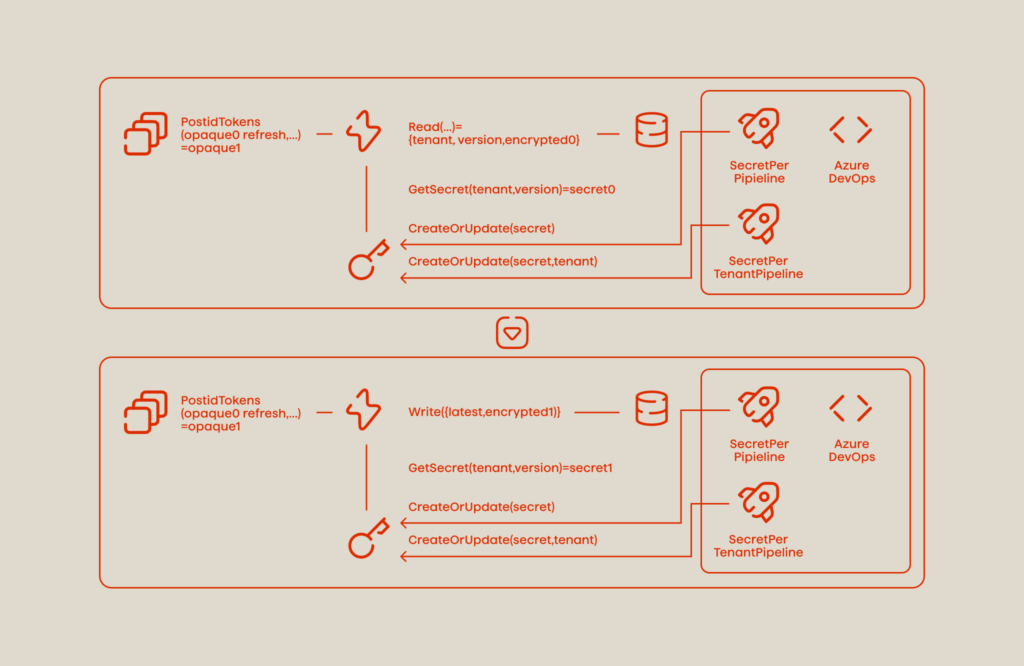
Here are the resources that are necessary for this workflow:

This blueprint leverages Azure Key Vault’s secure storage capabilities, Azure Functions for periodic key retrieval and token storage, a database for storing encrypted keys, and Azure DevOps for managing the secret rotation and token refresh processes. In combination, these instruments enable a secure and efficient mechanism for managing OAuth 2.0 OBO refresh tokens in web service development. They propel the longevity and security of access and refresh tokens, particularly in situations associated with offline access, and adhere to top-notch practices for secure key storage and access management.
In this scenario, Key Vault acts as a centralized repository for secret encryption keys that are specific to each Azure AD tenant. The solution allows us to maintain the confidentiality of refresh tokens and securely store them alongside the latest secret key version. Additionally, the integration of Azure Functions streamlines the periodic retrieval of the latest secret key from Key Vault and the retrieval of refresh tokens from the Microsoft identity platform.
FAQ
Final thoughts
Azure Key Vault is a highly useful resource that assists organizations in meeting their security and compliance requirements and confidently protects sensitive data. Its centralized, secure, and scalable architecture makes it possible for businesses to effectively monitor access to essential information and minimize the risk of data breaches. In addition, its integration with other Azure services, such as Virtual Machines, Logic Apps, or Data Factory, further enhances its functionality and usability. Given these advantages, Key Vault simplifies the process of managing cryptographic keys and secrets, reduces the need for further in-house expertise, and serves as a multi-facet solution for companies of all sizes.
Avenga is an international tech company with deep industry knowledge in pharma, insurance, finance, and automotive. The company’s IT specialists operate from 8 countries around the world and support digital transformation with projects along the entire digital value chain – from digital strategy to the implementation of software, user experience, and IT solutions, including hosting and operations.
Interested in building a transparent and productive technology partnership? Contact us.



Digital transformation in telecom: A complete guide
Your business results matter
Achieve them with minimized risk through our bespoke innovation capabilities. Fill in the form below.