






Microsoft 365 migration checklist: Your roadmap to a smooth transition


June 19, 2026 11 min read 626 views
A bird’s-eye view of the complex migration processes
Over the years, Microsoft 365 has gained a reputation as one of the most widely used productivity suites for businesses, with over 450 million commercial users worldwide. But a Microsoft 365 migration rewards the groundwork. The decisions made on identity, content classification, and sharing policy shape how the tenant performs from launch onward, and they set the conditions for what Copilot and downstream AI services can do inside that environment. The checklist below walks through the three stages of migration with the controls that matter most under Microsoft’s current cloud-first model.
A roadmap to a smooth Microsoft 365 migration
An effective migration to Microsoft 365 leans on a well-thought-out migration strategy and execution across three key stages: preparation, migration, and post-migration. Technical migration is only half the journey. Cross-department coordination focused on driving user adoption within a secure governance framework is equally essential.
With collaboration between IT teams and business leaders, organizations can fully leverage Microsoft 365 capabilities. Consult this Office 365 migration checklist to set coordinated milestones across security, infrastructure, and company culture as you thoughtfully switch to a new ecosystem:
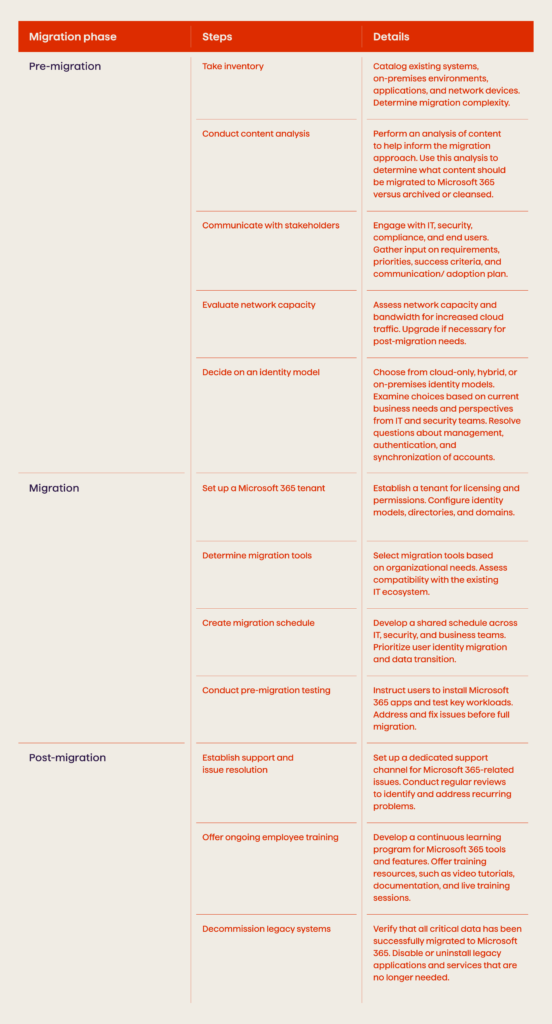
With the strategy set up correctly, the technical preparations and execution plan can commence. Let’s take a closer look at each of these steps to better grasp the bigger picture of the processes within the migration.
Explore how Avenga created an intranet solution for a large retailer of tobacco and smoke-free products.
Pre-migration checklist
When planning a migration, a company can start with high-level scoping and alignment of the stakeholders’ vision. It typically implies forming a cross-functional migration team, including IT leaders, end-users from each business unit, and project management support. Later, you can audit your existing systems and data storage to quantify users, products, data volumes, integrations with other systems, networking dependencies, and custom applications. Other essential steps are the following:
1. Take inventory. Catalog servers, software, and databases, as well as SaaS apps, networking equipment, and security tools. Pay particular attention to each exchange server and file share that will move to the cloud. Note which systems integrate with the Microsoft 365 capabilities you intend to deploy, including Exchange, SharePoint, Teams, or OneDrive. Quantify users, data volume, and network traffic to appropriately size your cloud tenant.
This inventory lets a team classify the migration complexity for planning phases and technical work. Importantly, identify which applications are on-premises vs. SaaS, as the migration approach will differ. SaaS applications may only require an identity provider change, if supported, while on-premises apps will need to be migrated or re-architected to work with Microsoft 365. Focus the inventory specifically on:
- Number, size, and type of mailboxes on the on-premises Exchange environment slated for mailbox migration to Exchange Online
- Information in file storage locations and the files’ size/quantity for SharePoint Online migration
- Current meeting and messaging systems that will be replaced by Teams
- Custom applications and integrations
2. Conduct content analysis. Deduplicate across silos and archive what does not need to sit on hot storage. Flag content with regulatory implications for sensitivity labeling. Clean up Active Directory before syncing to Microsoft Entra ID, removing inactive accounts, orphaned groups, and shared mailboxes nobody uses.
3. Ensure communication between stakeholders. Form a migration team with representatives across IT, security, compliance, legal, and different power users and/or application administrators. Hold discussions with them to gather perspectives on business priorities, use cases, governance needs, and timelines. Determine which migration tools and methods fit each data type. Agree on a training strategy for users based on their migration scope. Plan training sessions around each wave so users get hands-on time with the tools shortly before their data moves.
Well-informed users who understand new workflows, tools, and policies can drive faster adoption across organizations through independent migration of personal data. Develop user personas linked to their workflows and feature usage. Lastly, identify adoption champions in each department who can help drive excitement and usage of new tools after migration. They can offer support and advice to colleagues during and after the transition.
4. Evaluate network capacity. Assess existing network bandwidth and latency across critical sites. Cloud migrations shift more traffic to the internet so that upgrades may be required, particularly for video conferencing, cloud storage syncing, or remote access from branch locations after launch.
5. Decide on an identity model. Select either cloud-only, hybrid, or federated on-premises identity synchronization based on your current systems and direction. IT leads and security experts will map out permissions from legacy directories and craft new governance reflecting decentralized access.
6. Assess Copilot readiness. Review default sharing settings, apply sensitivity labels to high-value content, and tighten access to libraries flagged as high risk. From there, decide which user groups get Copilot licenses and on what timeline.
It is also a great option to assess organizational readiness through user surveys and interviews to determine typical workflows and feature utilization. With this baseline understanding of your as-is ecosystem, the team can design the ideal to-be state based on business goals then determine timelines with ample testing and training built-in. Drawing on best practices from prior deployments helps anticipate where rework typically appears. Another necessary element comes with the solicitation of executive buy-in and budget for any additional tools or staffing required for a smooth transition.
Discover how we migrated 1,500 users across 36 countries migrated for a global manufacturing company.
Microsoft 365 migration checklist
With infrastructure prepared and testing completed, the 365 migration process moves into production. It is usually achieved by using a phased rollout to specific groups at scheduled intervals. For example, your team can first migrate collaboration sites for the Marketing team to gauge the impact on network and productivity. Then, experts monitor their adoption and address issues like reconfiguring access permissions or providing additional training. Here are other vital actions your company can take down the road to guarantee that the migration goes smoothly:
1. Set up a Microsoft 365 tenant. Once pre-migration planning has aligned with the ecosystem requirements, the IT team provisions a Microsoft 365 tenant, adding licenses based on user counts per service like Exchange Online and SharePoint. Multi-geo capabilities should be configured if data sovereignty or in-region performance is required across your global footprint. Adjust the tenant for data retention policies, conditional access policies, and third-party identity provider integration according to security and compliance goals.
2. Configure identity management. Identity is the control plane for Microsoft 365 access and governance, so this configuration step carries extra weight. Select the account synchronization model and authentication methods that best align with the organization’s security standards. Configuring Microsoft Purview baseline policies in the empty tenant avoids retroactive fixes later.
3. Determine migration tools. Vet Microsoft first-party tools like SharePoint Migration Tool or Exchange Hybrid Configuration Wizard against a popular third-party migration tool such as MigrationWiz, SkyKick, or ShareGate to determine what fits best based upon workload priorities around mailboxes, SharePoint sites, or the Teams chat history. Many teams use third-party migration tools for diverse data types; no one-size-fits-all option exists. These platforms also help work around Exchange Online throttle limits on large mailbox moves.
4. Create a migration schedule. Plot a migration plan across departments and employment types according to launch timing and validation testing periods. Smaller tenants often work well with a cutover migration, while larger environments tend to suit a staged migration or a hybrid migration that keeps some workloads on-premises during the transition. Phase priority users and more complicated data sets earlier to allow sufficient testing cycles and changes to adoption before the organizational rollout.
5. Conduct pre-migration testing. Leverage early phases focused on smaller pilot groups to test migration technologies and processes. Verify permissions as well as end-user workflows in the new Microsoft 365 tenant. Refine approaches before you migrate data owned by entire departments.
After a successful pilot, you can expand the site’s migration to other business units in waves. Take the lessons learned from early groups and use them to smooth out the transition for each successive wave. A controlled phase-by-phase shift eliminates business risks and allows IT professionals to incrementally handle change rather than react to a company-wide disruption.
Post-migration checklist
In the months following the launch, the migration team shifts its focus to support user adoption even though additional data migrations may still occur in gradual waves. Below is a list of other vital things to consider after the larger bulk of the migration is accomplished:
1. Establish support and issue resolution. Have IT teams on standby to provide support during the initial post-launch weeks at a minimum but ideally spanning several months. Many queries will be end-user adoption obstacles rather than outright defects, such as Microsoft Outlook profile reconfigurations or missing access to a shared library. To address this, incorporate FAQs into help articles for self-service. Log any migration-related bugs, performance issues, or missing data to identify the root causes, i.e., is the problem on the source or the target side? Last but not least, acknowledge gaps in applications and business processes that will not be relevant anymore after the migration to Office 365.
2. Assess options to remediate. For example, rebuild Power Platform through Microsoft 365 data, re-engineer around out-of-box features on SharePoint, or integrate with SaaS substitutes. Specialized migration services can support the more complex rebuilds when in-house capacity runs short. This pragmatic reuse and rebuild approach provides a reliable path over complete rewrites.
3. Offer ongoing employee training. Continue training efforts through and beyond the launch milestone. Promote hands-on training tutorials and self-help documentation closer to individual departmental migration waves going live. Schedule periodic refresher sessions after launch to share power user tips and tricks along the journey. Include feedback into long-term change management plans and educational campaigns. Identify unofficial ‘power users’ within business units to nurture as champions embedded within the organizational fabric to provide peer coaching.
4. Decommission legacy systems. When the post-migration stability criteria are met, develop a timeline to deactivate and clean up legacy platforms. Avoid overly aggressive targets, as maintaining some systems like Active Directory on-premises may be necessary for compliance or hybrid identity model reasons. Establish permanent redirects, archived emails, or expansion of data retention policies to maintain access to critical information after decommissioning.
Migrating business systems and data to Microsoft 365 introduces various technical and organizational considerations, from infrastructure audits and security planning to end-user training and post-go-live support. Between planning appropriate environments and potentially large-scale data transitions and driving the adoption of unfamiliar tools now accessible to the entire workforce, incumbent knowledge gaps frequently surface even in mature IT teams.
How does migration to Microsoft 365 pay off?
At its core, Microsoft 365 removes infrastructure constraints that shackle productivity. Features like cloud-based Office 365 apps, Exchange Online, SharePoint team sites, OneDrive, and Microsoft Teams converge formerly disjointed email services and content collaboration into hub experiences accessible from anywhere, on any device. Furthermore, it frees users from physical workstations and serves as a robust backbone for open yet secure access.
Organizations migrating to Microsoft 365 consolidate previously disconnected solutions into intuitive cloud services and configurable platforms. What may have started as makeshift collaboration tools or project-specific apps can graduate into enterprise-grade workflows, backed by security and reliability. Through Microsoft 365’s ever-expanding suite of capabilities, businesses can also incrementally scale systems from departmental experiments to cross-functional solutions without the challenges of on-premises servers or patchwork integration.
FAQ
Measure twice, migrate once
A transition to Microsoft 365 offers businesses a chance to bring an impactful operational transformation; not just on the level of infrastructure, but also in the way employees deal with processes and collaborate. The effectiveness of the migration highly depends upon the initial analysis and planning phases.
On top of that, meaningful change needs engagement from IT teams modernizing delivery models as much as from user communities primed for new ways to drive productivity and teamwork. With a sound technical deployment and strategic adoption initiatives, migration opens up new vistas for the digital transformation of the company. This is a place where advanced technologies amplify individual and collective potential rather than inhibit it behind legacy barriers.
Plan a Microsoft 365 migration that sets the foundation for Copilot and agentic workflows: start a conversation with Avenga.



Digital transformation in telecom: A complete guide
Your business results matter
Achieve them with minimized risk through our bespoke innovation capabilities. Fill in the form below.