





Everything you need to know about a Salesforce integration


June 18, 2026 13 min read 510 views
Salesforce integration connects Salesforce to the other systems an organization runs, and to the AI agents that now act on data across those systems. Two changes are reshaping how this work is scoped. Agentforce gives Salesforce a native AI agent platform that needs governed access to external data. MuleSoft Agent Fabric, released in January 2026, added discovery and governance for agents running across Agentforce, Amazon Bedrock, Google Vertex AI, and Microsoft Copilot Studio. Architecture decisions made today shape whether an organization can deploy agents at scale within the next two years.
Salesforce remains the world’s largest CRM by some distance. IDC’s 2026 Worldwide Semiannual Software Tracker ranked Salesforce the top CRM provider for the thirteenth consecutive year, with 20.7% of the global market. The platform’s strength in integration is one of the reasons that lead persists.
What does Salesforce integration cover now?
Salesforce integration is the process of connecting Salesforce with other applications to create a unified user experience. You can mix all the benefits of third-party solutions with the vast capabilities of Salesforce in order to give your teams a perfect selection of features pertaining to both platforms.
A Salesforce integration project does one or more of the following. It synchronizes records between Salesforce and other applications. It exposes data and actions to external systems through Salesforce APIs. It pulls outside data into Salesforce so users see a unified view that combines data in Salesforce with data from other applications. It gives Agentforce agents the ability to read from and act on systems outside the CRM.
The work is judged on different criteria than it was in the past. Data fidelity and latency are still relevant. What also matters now is whether the integrations produced are reusable, governed, available in real time, and discoverable by agents. Salesforce’s 2026 Connectivity Benchmark Report, based on a survey of 1,050 IT leaders, found that 96% say AI agent success depends on cross-system integration. The same report puts the average number of agents in production at 12 per enterprise, with that figure projected to grow 67% by 2027.
Benefits of Salesforce integration
Apart from being more convenient to use, integrations in Salesforce give you a number of tangible benefits that can help you take your business to a new level. According to Salesforce reports, integrations offer an average boost in revenue of up to 20% and an ROI increase of 50% within one year. When you add a 52% increase in lead volume, a 34% boost in sales revenue, and a 27% rise in lead win rates here, the benefits of Salesforce start to look even more staggering.
Higher customer retention
Companies running integrated Salesforce CRM keep more customers than those without one, because reps and service agents see the full account history when they speak with a customer.
Faster decisions across teams
Sales, service, finance, and marketing data sit in one layer, so managers and Agentforce act on the full customer picture rather than a fragment of it.
Cross-system automation
A properly built integration allows Salesforce to trigger workflows in ERP, billing, support, and partner platforms without manual handoffs. That removes a class of errors that tend to surface later, in renewal or service conversations.
Lower switching cost for users
Sales and service teams stop tabbing between Salesforce and the other business tools they touch each hour, which saves time and cuts data-entry mistakes.
Agent-readiness
Organizations that invested in API-led integration architecture before AI agents arrived are now plugging those APIs into agent frameworks with minimal rework. Those still running point-to-point integrations are rebuilding from scratch.
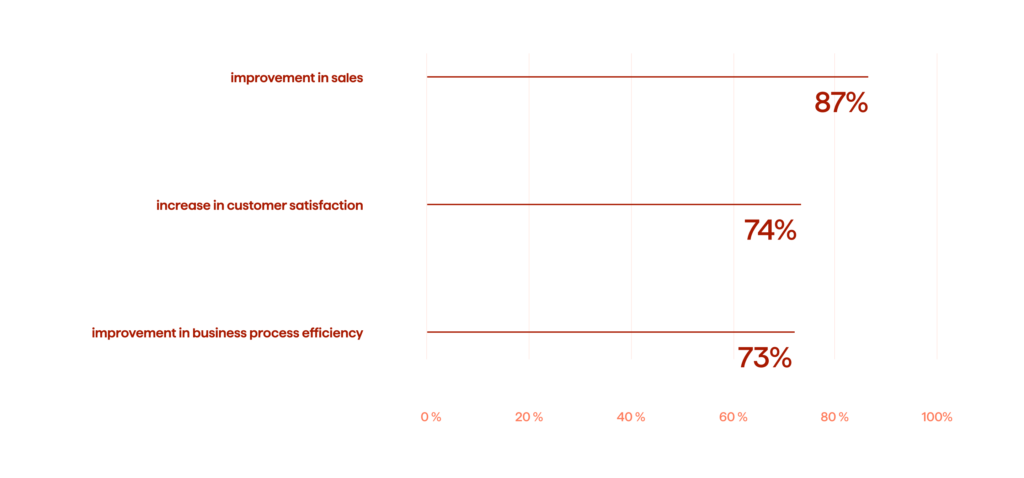
Overall, integration with Salesforce allows for a seamless and error-free flow of data across different departments and automates data synchronization. Most enterprises work with various software for enterprise resource planning, communication, accounting, data management, and other purposes. Salesforce bridges the gaps between these systems and integrates them into a single infrastructure that boosts business performance and improves ROI.
Learn how we achieved 400% personalization scaling with Einstein AI predictions for Stylepit.
Integration checklist: Before you start
Before launching a project, teams benefit from a brief introduction to Salesforce integration options and a clear plan. Integrations in Salesforce require careful deliberation on a number of levels. You have to approach this process while being aware of all the Salesforce integration options and having all the specifications in mind. Following the checklist below, you can gain insight into what sorts of integrations could benefit your business.
Planning and documentation
The core focus of the entire integration process is always the user. What will they gain out of it? You need to plan ahead and know exactly what you are going to achieve with your integration. Documentation also allows you to generate data on your users and analyze their wants and needs. Here, you need to take the following steps:
- Identify your business goals
- Formulate a vision and a mission for the project
- Identify the user and the data involved in the process
- Understand integration standards and best practices
Design the process
You need to learn more about integrations and the different ways you can approach this type of project. Will it be a code-based or app-based integration? What integration pattern are you going to use? You need to think about this at the design stage of the integration process.
- Prepare all the relevant data and insights
- Consider the limitations of the chosen integration types and patterns
- Research the available applications and see whether anything suits your case
Map the data flow
You’ll have to figure out what applications you can use and whether there are any that match the needs of your organization. To do that, you need to map out all the data flows across your business.
- Identify data endpoints
- Establish a connection for custom and out-of-box integration tools
- Evaluate the data transition performance of a potential application
Building a roadmap for the integration requires profound expertise in the Salesforce domain. Most of the preliminary decisions must be made at the design stage of the project, and you will need an expert partner who can help you figure out what type of integration would benefit your business.
Salesforce integration methods
There are three ways to approach the Salesforce integration process: app-based and code-based. Each of the available options can be implemented to address the needs of each particular business. Naturally, the choice would depend upon the unique need of your organization.
App-based integration
The app-based integration is carried out via dedicated applications that allow the users to integrate the data between two applications and create a unified platform. A Salesforce app integration is fairly simple and can be performed by users without a strong technical background.
Several third-party tools like Jitterbit and Zapier can facilitate a smooth transfer of data between Salesforce and external applications. For bulk imports and exports, tools like Data Uploader handle large data volumes between systems.
These applications offer seamless integration between Salesforce and third-party applications, but they might require some fitting to match the needs of your business. This is where you might need to enlist the assistance of a reliable Salesforce partner who can tailor these applications so as to make that integration as seamless and as smooth as possible.
Code-based integration
Apart from using specialized applications for integration into Salesforce, the process can also be carried out via a programming language. Salesforce offers Apex, a proprietary programming language with syntax similar to Java, for custom integration work. Some of the benefits of using code-based Salesforce data integration are:
- Built-in support for Salesforce Lightning Platform
- Easy to read and simple to use language
- Suits different API versions
- The language can be hosted and controlled on the Lightning Platform
MuleSoft and API-led connectivity
MuleSoft is Salesforce’s enterprise integration platform. Its role goes beyond moving data between systems. MuleSoft is where most large customers in the Salesforce ecosystem expose business capabilities as reusable APIs that any application, workflow, or AI agent can call.
MuleSoft Agent Fabric release added Agent Scanners that automatically discover agents across Salesforce Agentforce, Amazon Bedrock, Google Vertex AI, and Microsoft Copilot Studio, normalize their metadata, and synchronize them into a central registry. For organizations deploying AI agents at any scale, this addresses agent sprawl, where different teams build agents in different platforms without a shared way to find, govern, or trust them.
What are the types of Salesforce integration?
The common types of Salesforce integrations suit different companies and different use cases. What it comes down to are the needs of a particular business. You’ll want to analyze the needs of your organization and define what type of integration would benefit you the most. Making the right choice is essential for the growth of your business.
User interface integration
Integration of user interface (UI) is a preferred option for businesses that need to provide a centralized user experience for all categories of users. Users continue to use Salesforce as their primary interface even when third-party applications run behind it and look and feel like a part of Salesforce.
Business logic integration
Business logic integration connects Salesforce and other systems so that an action in one platform triggers calculated work in another. To make such connections, Salesforce experts use Apex Callouts for outbound and Apex Web Services for inbound connections.
Data integration
Salesforce data integration is used when you need to synchronize data from two or more systems in real-time. Real-time integration between Salesforce and external systems uses Simple Object Access Protocol (SOAP) and Representational State Transfer (REST) Application Programming Interfaces (APIs) allowing for real-time data sharing between all the extensions you add.
Agent integration
The newest category. Agentforce agents need to read external data and trigger external actions. Three approaches let external services integrate with Salesforce at the agent layer. Native Salesforce Flows with HTTP callouts for simple cases. MuleSoft APIs exposed as agent actions for governed enterprise scenarios. External Services with OpenAPI specifications for fast SaaS connectivity. Most enterprises end up combining all of them, with the choice in each case driven by frequency of use and data sensitivity.
Explore how Avenga created a powerful research management solution for SourceScrub.
Salesforce integration patterns
Each integration scenario is fairly unique, but the Salesforce integration patterns below describe the common challenges and requirements developers are likely to deal with. Several different integration patterns might match the needs of each particular integration case, and the integration experts will need to choose an appropriate pattern.
Request and reply: Remote process invocation
This is a common integration pattern where developers start the process on a remote system and wait until the process is finished. This pattern establishes communication between the sender and receiver making sure that the sender will only be able to initiate the data integration when the receiver approves it. For the process to begin and continue, the receiving system must be up and running.
Fire and forget: Remote process invocation
Also known as an asynchronous integration pattern, fire and forget allows for data integration without approval from the receiver. Simply put, the developers can initiate the process of integration whenever they need, and updates to Salesforce records or downstream systems can be transferred without waiting for the receiver to confirm.
Batch data synchronization
In batch data synchronization, the data is collected into batches and integrated at a scheduled period of time. The developers integrate the whole data set, batch by batch, when the business needs it.
Remote call-in
Salesforce itself was not intended for order processing, but it is possible to integrate such solutions into the Salesforce infrastructure. The developers can integrate a third-party (remote) system that manages the orders and sends call-ins with an order status to Salesforce.
UI updates based on data changes
It is possible to visually represent each customer interaction within Salesforce thanks to a vast number of integrations. UI updates allow the sales reps to see the status of an order updated in real-time. For instance, this Sales force integration pattern allows the sales reps to see whether the payments on the order have been successful or not. UI updates based on data changes allow for more efficient cooperation between the sales reps and the customers.
Data virtualization
Salesforce Connect supports data virtualization for cases where data should appear in Salesforce without being copied into the platform. The data can be visualized for more comfortable presentations and analytics. You can get visually appealing and easy-to-read data charts. Thanks to a variety of visualization APIs, you can have all sorts of visualizations so that you can read your data easily.
Building an all-in-one retail solution with Salesforce
As an official Salesforce integration partner with a total of more than 400 Salesforce certifications and a talent pool of 100+ certified experts, Avenga leverages the vast capabilities of Salesforce to boost the flexibility and velocity of businesses in order to give them a competitive edge.
We helped one of our clients to integrate an industry-specific Salesforce system with a versatile retail execution solution. Our team conducted a system audit and found ways to enrich the capabilities of the client’s existing application with the additional Salesforce functionality.
Furthermore, we customized the app to meet the needs of the managers, sales representatives, and merchandisers. Our client got a solution that helps to build dashboards and evaluates a number of performance indicators, which allows the users to manage the real-time performance of the campaigns.
FAQ
Final thoughts on Salesforce integration
Salesforce is the most popular CRM in the world and there are good reasons for that. It is simple, convenient, and fast, and it offers nearly limitless opportunities for integrations that are transforming businesses across industry verticals. The organizations that get the most value from Salesforce integration treat it as an architectural decision rather than a one-off project, since the choices made today set the limits on what AI agents and connected workflows can do over the next several years.
If you are planning a new Salesforce integration or rethinking an older one, our consultant can review your current architecture and propose a path forward. Talk to our Salesforce team.



Digital transformation in telecom: A complete guide
Your business results matter
Achieve them with minimized risk through our bespoke innovation capabilities. Fill in the form below.