






What is device fingerprinting and how does it work?


June 30, 2026 13 min read 1066 views
When advertising moved from the offline world to the online one, advertisers were presented with an opportunity they hadn’t had before — individual ad targeting.
Instead of relying on contextual targeting (e.g., showing an ad for new boats in a magazine about boats), they could show their ads to Internet users based on their behavior — e.g., which websites they visited previously — and other data, such as their location. This method became the ad-targeting standard for online advertising companies from the mid-2000s onwards and relied heavily on web cookies.
Over the years, however, users have started to delete cookies, browsers have limited their use, and ad blockers have risen.
So, in a bid to keep behavioral targeting alive and ensure advertising companies can identify and track users across the web, a new form of web tracking was created — device fingerprinting.
What is device fingerprinting?
Device fingerprinting (aka canvas fingerprinting, browser fingerprinting, and machine fingerprinting) is a process used to identify a device (or browser) based on its specific and unique configuration. Unlike web cookies that are stored client-side (i.e. on a user’s device), device fingerprints need to be stored server-side — i.e. in a database.
What information is collected to create a device fingerprint?
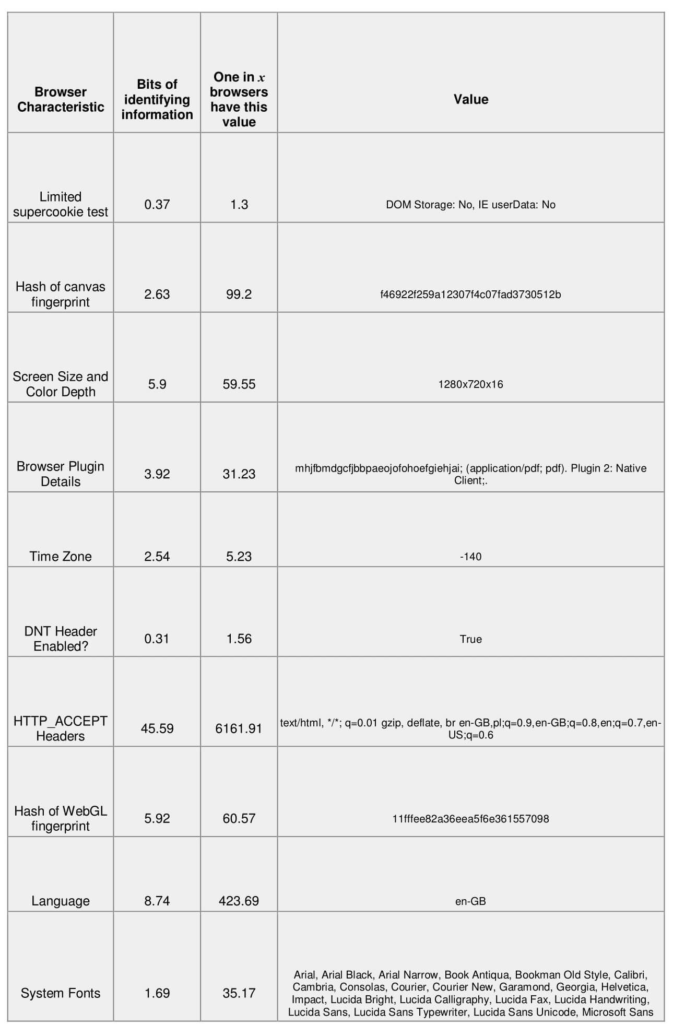
Device fingerprinting collects a combination of browser, device, network, and system attributes that together create a unique identifier for a user’s device. While a single data point is rarely unique on its own, combining multiple signals makes it possible to distinguish one device from millions of others.
Device fingerprinting services typically analyze information such as:
- IP address
- HTTP request headers
- User agent string
- Installed plugins
- Client time zone
- Information about the client device: screen resolution, touch support, operating system and language
- Flash data provided by a Flash plugin
- List of installed fonts
- Silverlight data
- List of mime-types
- Timestamp
Why use device fingerprinting?
Device fingerprinting helps identify returning devices when cookies are unavailable, deleted, or restricted. It provides an additional way to recognize users across online interactions, making it useful for advertising attribution, analytics, and fraud prevention.
As people become more connected and carry out an increasing number of activities online, they also tend to switch between multiple devices. This makes it harder for brands to recognize returning users and accurately measure customer journeys.
This problem is only augmented because normal means of online tracking are more challenging today. Cookies, which have been the mainstay of digital advertising for years, have become more and more untenable in today’s privacy-sensitive environment.
First of all, cookies do not offer a reliable way to track mobile usage.
Secondly, cookies can be easily deleted by the consumer.
And thirdly, cookies make ads and ad campaigns more easily recognizable to ad blockers, effectively killing any chance an advertiser may have of connecting with a potential customer. With ad blocker usage set to grow by double digits this year, this is a real concern for ROI-conscious advertisers.
Device fingerprinting offers a backup method of tracking when cookies can’t get the job done.
For example:
A person is looking to book a holiday to Paris. In the course of browsing the internet, he/she clicks on a banner ad advertising an all-inclusive package from a travel agency. However, the person does not book a trip immediately. Instead, they close their web browser (and thus potentially delete the cookies connected with the paid advertising they interacted with) and go to bed.
The next day, the person decides to check out the travel agency’s website again and this time simply types in the agency’s address in the web browser. After perusing the site a bit, they end up booking the all-inclusive package they had originally seen in the ad.
Now, because the conversion was completed the second time and could not be attributed to the banner ad by means of a cookie, the travel agency is unable to accurately determine the ROI of that ad.
But thanks to device fingerprinting, it is possible to ascertain that the customer who booked the travel package used the same web browser (with the same “fingerprint”) as the one where the ad was previously served.
How does device fingerprinting work?
Device fingerprinting works by collecting a combination of browser, device, and network characteristics to create a unique identifier for a user’s device. Instead of storing this identifier on the device like a cookie, the fingerprint is generated from these data points and stored on a server for future recognition.
From there, it’s much like playing the detective board game Clue using bits of information about Internet users — you may not always have a complete picture of each user, but the more information you have, the easier it is to apply statistics and narrow it down to a single person.
Likewise, providers of device fingerprinting put together data points, like the ones mentioned above. Then, they assign a unique fingerprint (i.e. a hash) to it. When used in combination with cookies or other identifiers, the accuracy of the tracking and attribution is greatly improved.
The downside is that calculating the hash and storing all the associated data is computationally intensive.
Running device fingerprinting requires large amounts of storage since the fingerprints (or IDs) are not distributed back to the browser, as is the case when cookies are served, but instead must be kept server-side (i.e. in a database). The advantage here for companies using device fingerprinting is that it’s almost impossible to block the creation of device fingerprints (more on that below).
Device fingerprints can also be enriched by linking the “person” to other fingerprints (i.e. devices) — by identifying patterns of similar fingerprints coming from a similar source. With enough data it is also possible to associate a user’s identity to multiple devices.
What is my device fingerprint?
A device fingerprint contains information collected about your device for the purpose of identification. Identifying whether device or browser fingerprinting is in place is generally difficult to detect.
There are browser plugins that, to some extent, protect users against leaving too complete fingerprints and non-consensual web tracking and services, such as Cover Your Tracks, “auditing” browsers and generating reports about your device’s fingerprint. The Tor browser also offers some protection against tracking someone based on their browser fingerprint.
What’s ironic about device fingerprinting is that the more privacy-centered add-ons you install on your browser (e.g., Privacy Badger or Ghostery) to protect the remnants of your privacy, the easier it becomes to identify you because of the uniqueness of your browser’s configuration.
Possible use cases of device fingerprinting
Even though many people use the same type of device (e.g. the same brand of laptop or same model of smartphone), each of them uses a slightly different configuration — e.g. different browser, set of plugins, system fonts, hardware.
Based on this information, a device fingerprint can be created that is very unlikely to be the same for two individual users.
Device fingerprinting is, obviously, helpful for targeting, but shouldn’t only be seen as an inherently bad thing that only benefits advertisers and marketers. Fingerprinting has a number of useful applications — from helping to control digital rights management to fighting bank fraud. Here are a few of examples of how device fingerprinting can be used:
Analytics and tracking
Probably the most widely used example of device fingerprinting is for the purposes of analytics and ad tracking. In a web analytics context, device fingerprinting is used to accurately identify and report on unique (i.e. returning) visitors.
Advertisers and AdTech vendors also use device fingerprinting to identify and track users across the Internet, which allows them to create user profiles and target them with personalized ads.
Preventing credit card and bank fraud
Device fingerprints can also be put to good use in the financial section. One example would be to identify whether an Internet banking session has been hijacked.
It can also be used to identify credit card fraud. The uniqueness of the fingerprint makes fraudulent requests to a website stand out as it shows the requests are made from the same device – albeit through a proxy, with a different credit card, name on the card, or even using a fake IP address.
Combating ecommerce fraud
Device fingerprints can be instrumental in determining if an order is coming from a fraudster and should be canceled. There are numerous other applications to help solve this issue, but fingerprinting generally helps assist with this because regular customer fingerprints are predictable and normal, which makes it somewhat easy to identify fraudulent customers.
The impact the GDPR has on device fingerprinting
What makes the GDPR challenging in terms of cookies and various tracking methods is its relatively vague definition of personal data.
Even though device fingerprinting only collects data about a user’s device (and not information like their name or email address), the foundation of fingerprinting falls under the category of personal data. The principal is that these bits of information relate to an individual and can be used to identify them, directly or indirectly.
In the context of GDPR, personal data is any information that might be used to identify an individual. Rather than establishing a person’s identity, the focus is on being able to identify an individual, for example, identify returning visitors to a website. This definition makes both cookies and device fingerprints examples of personal data.
On the other hand, GDPR is agnostic with regards to technology and doesn’t provide any explicit guidelines about device fingerprinting. What it does provide, however, are general guidelines concerning tracking users across the Internet, irrespective of methods or techniques used.
Article 4 of the GDPR defines personal data as any information relating to an identified or identifiable natural person using online identifiers like cookies, device IDs and IP addresses.
And that’s where the device fingerprint technique collides with the regulation, as, in most cases, such data can only be processed following the user’s consent.
Can device fingerprinting be legal under GDPR?
Processing personal data under GDPR can be legal, but only when it meets one of the 7 lawful bases, such as legitimate interest or consent.
To process data based on legitimate interests you need to make sure that the rights and freedoms of data subjects are not overridden by the data controller’s legitimate interest.
Therefore, relying on legitimate interest in the context of device fingerprinting will likely be reserved for special situations, such as fraud prevention or identity theft.
If a company wishes to use device fingerprinting for advertising and marketing purposes, then they’ll have to obtain explicit consent from the user to do so. To ensure companies using device fingerprinting are operating in accordance to law, the best thing they can do is assess whether they have a legitimate interest to collect and process a user’s fingerprint or collect user consent.
FAQ
Final thoughts
As noted already, the digital landscape is becoming more and more complex. For marketers and advertisers, this means scrambling to keep up with the burgeoning array of touch-points that are created as consumers become more and more spontaneous with their browsing habits.
As cookies become less and less effective in identifying online users, new technologies like device fingerprinting – with their reliance on static, unchangeable information – will play a significant role in powering digital advertising, while at the same time, face a number of challenges due to new privacy rules, like the GDPR.
If you’d like to explore compliant approaches to user identification for your organization, get in touch with us.



Your business results matter
Achieve them with minimized risk through our bespoke innovation capabilities. Fill in the form below.