






Get 100% code coverage for Salesforce custom metadata-based decisions


July 10, 2026 12 min read 617 views
Many applications use configuration data. Configuration data might be relevant to the entire organization, or subset of users or might be different for each user. In other words, it is possible to define some global configuration relevant to the whole organization or some minor configuration which is relevant to some small departments. In this article we will focus only on global configuration settings.
There are different possible solutions for storing configuration data. Configuration data can be stored in
- Custom Objects,
- Custom Settings and
- Custom Metadata records.
Configuration patterns like this come up constantly in Salesforce development work. Custom objects are not usually used for storage of configuration data but in some extreme edge-cases scenarios like if there is a need to have an encrypted text field, custom objects might be also used for configuration data since neither custom settings nor custom metadata support encrypted fields feature.
In most cases, however, custom settings or custom metadata are used.
If you need to go further and deploy custom metadata records directly from Apex, read Avenga’s guide on deploying custom metadata records from Apex code, a natural next step once your test coverage is solid.
Salesforce custom metadata in Apex: Key takeawaysOmnichannel fulfilment strategy: Key takeaways
- Custom Metadata is the default choice over Custom Settings. List Custom Settings have been deprecated since Spring ’18, Custom Metadata records are deployable, making them the standard for configuration data.
- You cannot insert or construct Custom Metadata records in Apex. This is the core obstacle to writing unit tests that cover business logic depending on custom metadata values.
- Official Salesforce documentation does not solve this. There is no native way to achieve 100% code coverage for branches driven by custom metadata field values.
- The fix is JSON.deserialize. By creating a CustomMetadataDAO class and using JSON.deserialize, you can mock custom metadata records in test context without inserting them.
- Separate test contexts for each logic branch. Once the DAO pattern is in place, each branch of conditional logic can be tested independently, achieving full coverage without touching real metadata records.
What is a custom metadata type in Salesforce and when to use it
Understanding custom metadata types is the starting point for any Salesforce developer working with configuration data. A custom metadata type is a metadata object that stores application metadata directly in your Salesforce org, not as data records, but as deployable metadata.
Unlike custom objects, custom metadata type records travel with your deployment. This makes them ideal for configuration that must move consistently across different Salesforce environments, from sandbox to staging to production.
To create a custom metadata type, go to Salesforce Setup, search for Custom Metadata Types, and select New Custom Metadata Type. You can then define custom fields on it, Checkbox, Date, Text, Number, and more. Let’s go ahead and create a simple example: a custom metadata type that defines routing rules for payment processing.
Custom metadata types let you combine configuration records with custom functionality in a single deployable unit. This is what makes them so valuable for enterprise development on the Salesforce platform.
Custom metadata vs deprecated list custom settings in Salesforce
Custom Metadata is a feature delivered back in Summer ‘15 release. It is similar to (Deprecated) List Custom Settings, but it has several key differences. List Custom settings are deprecated since Spring ’18 release, and custom metadata functionality should be used instead of them.
If you are new to the platform, start with our overview of what Salesforce is.
Similarities between custom metadata types and custom settings
- Both List Custom Settings and Custom Metadata resemble Custom Objects. They contain table values and resemble database tables.
- Both List Custom Settings and Custom Metadata allow creation of Checkbox, Date, DateTime, Email, Number, Percent, Phone, Text, Text Area, URL fields.
- Admin Users can create both List Custom Settings and Custom
- Metadata definition using Salesforce native UI capabilities as well as deploy List Custom Settings and Custom Metadata definition using Ant Migration Tool or SFDX the same way custom objects are deployed.
- Users can create both List Custom Settings data and Custom Metadata records using Salesforce native UI capabilities. However, since List Custom Settings are deprecated, this old functionality must be enabled on new environments if needed.
- You can select Visibility for both Custom Settings and Custom Metadata to have it either Public or Protected. Protected Visibility prevents managed package users from accessing the custom settings or custom metadata.
Key differences between custom metadata and custom settings
Same table
Usually, Custom Metadata records are very attractive to developers since they can be deployed.
So, it is also better to use Custom Metadata configuration than Custom Settings configuration since Custom Metadata records can be deployed and during migration some default settings might be migrated from one organization to another with metadata itself. Since Spring ’18 List Custom Settings are deprecated, so Custom Metadata became the default option.
However, the fact that custom metadata records cannot be constructed or inserted in Apex code brings obstacles to the process of writing unit tests to cover business logic depending on the custom metadata record values. Let’s discuss this more deeply considering the following example.
Custom metadata vs custom object: which to choose
The difference between custom metadata and custom objects is often misunderstood. Both are similar to custom objects in structure, they have fields, records, and can be queried via SOQL. But the use cases diverge significantly.
Custom metadata type records are deployable. Custom object records are not. If your configuration data needs to move between Salesforce environments, custom metadata wins every time. Custom objects stay behind when you deploy.
Custom metadata is also better for managed packages. You can protect custom metadata types with Protected visibility, preventing managed package users from reading or modifying the records. Unlike custom object records, protected custom metadata types give ISVs control over what package users can access.
Use custom objects when you need encrypted fields, when records are user-generated at runtime, or when you need complex relationships between large datasets. Use custom metadata types for configuration that Salesforce developers control and deploy.
If you need to go further and push custom metadata records programmatically, read Avenga’s deep dive on deploying custom metadata records from Apex code, including the undocumented limits on record volume per deployment call.
Best practices for using custom metadata in Salesforce development
Mastering Salesforce custom metadata means following a set of consistent practices that keep your org clean and your deployments predictable.
Keep one record per logical configuration unit. Do not overload a single custom metadata type record with unrelated fields. Define custom metadata types narrowly so each type has a clear, single responsibility.
Always use the Metadata API or Salesforce CLI to deploy. Change sets work, but the Salesforce CLI gives you version-controlled, repeatable deployments across multiple Salesforce orgs. This is especially important when you manage custom metadata types and custom settings side by side.
Add validation rules where appropriate. Salesforce allows validation rules on custom metadata types, just like on custom objects. Use them to protect configuration integrity before records reach production.
Use adding custom fields carefully. Every new custom field on a metadata type increases complexity. Document the purpose of each field clearly. Salesforce provides no built-in description field at the record level, so your field labels and help text must carry that context.
Never hardcode metadata API names in Apex classes. Reference custom metadata type records through a DAO layer so your Apex code stays testable and your metadata names stay changeable without touching logic. Governor Limits apply to custom metadata queries too. For a detailed breakdown of how CPU time and dynamic Apex features interact in production, see Avenga’s guide to Apex describe performance and Governor Limits.
How to use custom metadata in Apex without breaking test coverage
Using custom metadata in Apex introduces a well-known challenge: you cannot insert or construct custom metadata type records in Apex code. This breaks the standard test data setup pattern that most Salesforce developers rely on.
The problem surfaces when your Apex code routes decisions based on custom metadata record values. Each branch of your conditional logic requires a different record value — but you cannot create records without touching production data or metadata deployments.
The solution is to use custom metadata in Apex through a DAO (Data Access Object) layer combined with JSON.deserialize. This approach lets you mock custom metadata type records in test context. Your Apex code calls the DAO rather than querying directly, and your test class injects mock records via the DAO.
This pattern lets you use custom metadata types along with some Apex code to route payments, apply configuration logic, or control feature flags, all while keeping test coverage at 100%. It also makes your Apex classes easier to refactor because the metadata access point is centralized.
Custom metadata done right saves hours of test coverage headaches down the line. Talk to Avenga’s Salesforce development team about building clean, testable, deployable configuration architecture for your org.
Use case: 100% code coverage for custom metadata records in Apex
Assume we need to build an application for bank interest rates calculation.
Some banks might use simple interest rate calculation; another might use compound interest rate calculation.
We might be interested in building an application which would allow us to use any of these two calculations based on configuration.
Assume we have created a custom metadata type Custom_Metadata__mdt and created a picklist field on it Custom_Field__c and created a custom metadata record with DeveloperName value Default which we are going to use to determine which calculation to use.
Assume we created some simple class BankInterestCalculationLogic with the following code:

We might actually employ a strategy pattern to decide which formula to use for interest rate calculation, but for sake of simplicity let’s consider this piece of code. Anyway, even using a strategy pattern we would have some method to determine which strategy to use.
The main focus here is how to write unit tests which would use different strategies based on current value in the custom metadata record.
Simplest try to write test class for this might look like following:
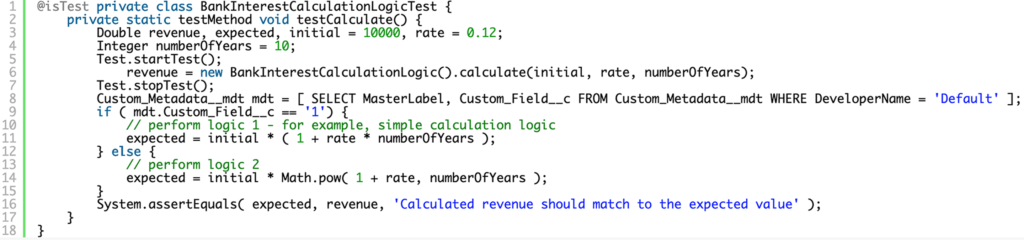
This test class will succeed both in cases when the Custom_Field__c field value in the record is 1 or 2 but will fail with error
System.QueryException: List has no rows for assignment to SObject if someone deletes this custom metadata record.
However, the main problem is one of the branches of conditional statement will not be covered. If the value is 1 then the branch implementing the compound interest rate calculation will not be covered. Otherwise, if the value is 2 then the branch implementing the simple interest rate would not be calculated.
Unfortunately, official documentation doesn’t provide a solution how 100% of coverage can be achieved in this case.
We can’t insert custom metadata records (despite the fact that users may play with them and delete and modify the data in the custom metadata record).
We can’t even construct a custom metadata record to use it inside Test.loadData.
However, there is a solution to this problem.
We might overcome this obstacle by using JSON.deserialize method.
Let’s generate a class to deal with Custom Metadata records

and basic test for it

Basic test gives 100% coverage for the CustomMetadataDAO class and also provides a utility method to set custom metadata records for the tests.
Look how can we use it to get 100% coverage to cover both interest rates calculations.
Let’s refactor our BankInterestCalculationLogic class like following
BankInterestCalculationLogic class like following:
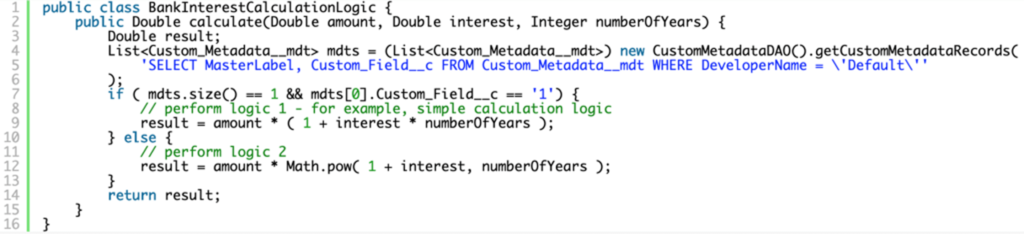
and test like following
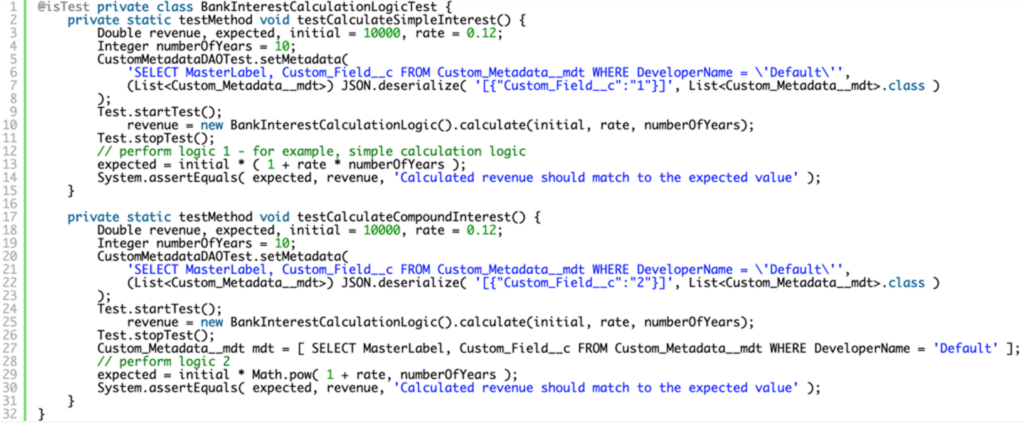
Custom metadata loader: managing records outside of Apex
The custom metadata loader is a tool for Salesforce developers who need to manage custom metadata record volumes that are impractical to handle through Setup UI or individual deployments.
Provided by Salesforce and available as an open-source tool on GitHub, the custom metadata loader lets you upload custom metadata records via CSV file. It uses the Metadata API under the hood, converting your spreadsheet rows into deployable metadata records without requiring Apex code or CLI setup.
This is especially useful when you need to create records in bulk, for example, loading hundreds of payment routing rules or integration field mappings across different Salesforce environments. The alternative is editing records one by one in Salesforce Setup, which does not scale.
The loader also supports update custom metadata operations, allowing you to modify existing records in bulk and redeploy them. For teams that manage custom metadata types and custom settings alongside each other, keeping a CSV-based source of truth for metadata records simplifies governance and reduces the risk of environment drift.
If you are new to the platform, Avenga’s Salesforce overview and tutorial covers how metadata-driven architecture underpins everything from Apex triggers to custom objects.
FAQ
The future of Salesforce development starts with clean, testable code
Voila! Now we have 100% coverage and test contexts for different logic branches are separated!
Need help mastering Salesforce custom metadata and ensuring full test coverage? Our experts are ready to guide you. Contact us today to learn how we can help you build more robust, reliable Salesforce solutions.

Data-driven retail: How retail data and AI shape the future of retail


Your business results matter
Achieve them with minimized risk through our bespoke innovation capabilities. Fill in the form below.